PostgreSQL
PostgreSQL🌐 (often shortened to Postgres) is:
a modern, mature database system
FLOSS (free/libre and open-source software)
cross-platform
scalable
developed by a community
History of the name:
1970s: Ingres🌐 (Interactive Graphics and Retrieval System)
1985: POSTGRES
1996: PostgreSQL (SQL replaced POSTQUEL as the query language)
Database system and tools:
Run Postgres in Docker
You will need Docker:
docker-compose.ymlservices:
  postgres:
    image: postgres:latest
    container_name: rdbs-pg
    environment:
      POSTGRES_USER: me
      POSTGRES_PASSWORD: me
    ports:
      - 5432:5432 # runs externally on localhost:5432
    volumes:
      - postgres_data:/var/lib/postgres/data # persistent data
      # optional: initialize database when container is created
      # - ./init:/docker-entrypoint-initdb.d

  pgadmin:
    image: dpage/pgadmin4:latest
    container_name: rdbs-pgadmin
    environment:
      # as simple as possible
      PGADMIN_DEFAULT_EMAIL: me@me.me
      PGADMIN_DEFAULT_PASSWORD: me
    ports:
      - 8001:80 # runs externally on localhost:8001
    depends_on:
      - postgres

  # Optional: CloudBeaver - web-based database management tool
  # cloudbeaver:
  #   image: dbeaver/cloudbeaver:latest
  #   container_name: rdbs-cloudbeaver
  #   ports:
  #     - 8002:8978 # runs externally on localhost:8002
  #   depends_on:
  #     - postgres

volumes:
  postgres_data:
Build and start the multi-container application. Run in the terminal:
bashdocker compose up # optionally: -d --build
Then, in the browser:
pgAdmin: localhost:8001
CloudBeaver: localhost:8002
Configure pgAdmin
Login: me@me.me / me (set in docker-compose.yml)
Object Register Server:
General/Name: …
Connection/Host name:
rdbs-pg(notlocalhost)Username:
me, Password:me(set in docker-compose.yml)
Configure CloudBeaver
Settings / Administrator Credentials:
choose a username and password
Login:
use the credentials you chose
[+]/ Find Database (or New Connection: PostgreSQL)Host:
rdbs-pg; port:5432Authentication:
me/meTest ➜ Create
Run SQL statements
pgAdmin: Tools / Query Tool
CloudBeaver: SQL editor
In pgAdmin
There are two databases:
postgres (default system database)
me (created in docker-compose.yml)
Servers Databases(2) me Schemas(1) public Tables … [right-click] Query Tool
sqlSELECT version();
# PostgreSQL ...
SQL is case-insensitive. By convention, keywords are written in uppercase — a convention that predates syntax highlighting?
sqlselect version(); -- works the same, so I'll write in lowercase
SQL🌐 – Structured Query Language
The five primary sublanguages:
DDL: Data Definition Language
CREATE,ALTER,DROP,TRUNCATE
Defines, changes, and removes database objects such as tables, indexes, and views.DML: Data Manipulation Language
INSERT,UPDATE,DELETE
Modifies data stored in database tables.DQL: Data Query Language
SELECT
Retrieves (queries) data from the database.DCL: Data Control Language
GRANT,REVOKE
Manages user privileges and access to database objects.TCL: Transaction Control Language
BEGIN TRANSACTION,COMMIT,ROLLBACK,SAVEPOINT
Controls database transactions, allowing changes to be committed (saved) or rolled back (undone). Supports data integrity.
Example database model and working with tables (DDL, DQL, DML)
Adapted from the PostgreSQL Tutorial🐘.
Continents:
sqlcreate table continent (
  id   integer      primary key,    -- PK implies "not null"
  name varchar(100) not null unique -- "not null" must be explicit here
);
-- table name: continent or continents?
Countries:
sqlcreate table country (
  code         char(2)      primary key,
  id_continent integer      references continent(id), -- Yoda: id_continent
  name         varchar(100) not null unique
);
Places (cities, weather stations, …):
sqlcreate table place (
  id           serial       primary key,
  name         varchar(100) not null,
  code_country char(2)      references country(code),
  latitude     decimal(8,5) not null,  -- precision: ~1m
  longitude    decimal(8,5) not null,
  elevation    int                     -- meters above sea level
);
Daily weather:
sqlcreate table weather (  -- daily weather data
    id       serial primary key,      -- is it needed?
    id_place int    references place(id),
    date     date   not null,         -- date / date 😇

    temp_lo  decimal(4,1),            -- daily min temp (°C)
    temp_hi  decimal(4,1),            -- daily max temp (°C)
    precip   decimal(6,2),            -- precipitation (mm)

    unique(id_place, date)            -- ensure one record per day per place
);
ERD: Entity–Relationship Diagram
pgAdmin:
Tools / ERD tool
Table / ERD for table
You can choose different approaches:
A full ERD of the database, including its tables and relationships
A simple diagram, e.g. in draw.io; draw the model manually, then create the database schema from it
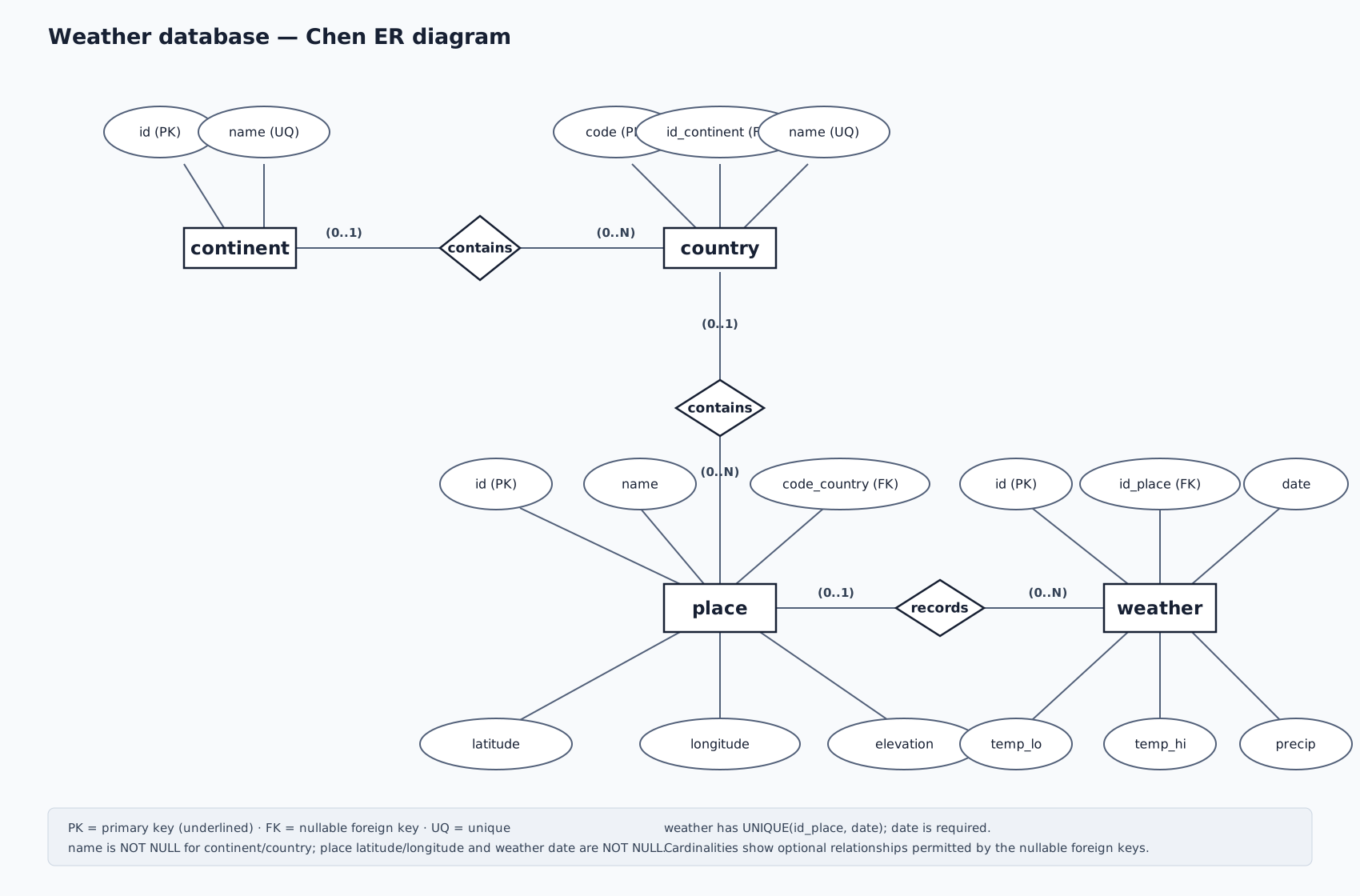
Chen
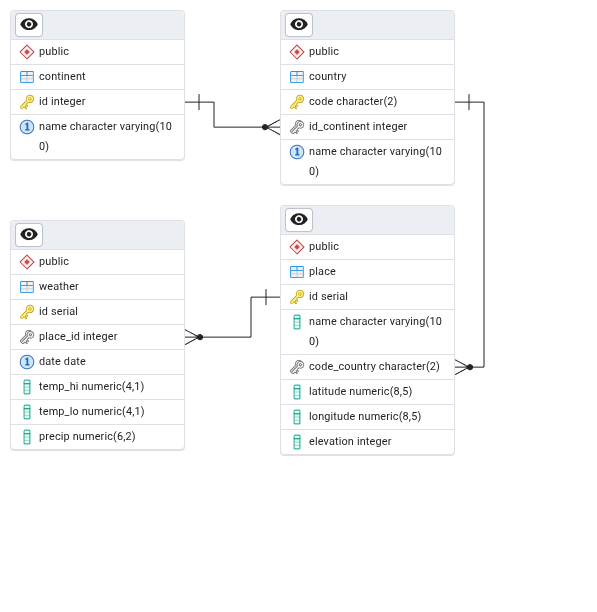
Generated Crow's Foot diagram:
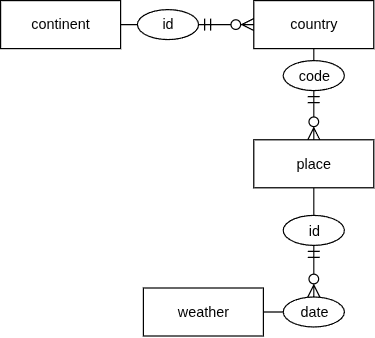
Hand-drawn (rolled-my-own) Chen + Crow's Foot diagram:
Database integrity
Referential integrity ensures that relationships between tables remain valid.
PK
primary keyFK
references table(field)
Data integrity ensures that data in a table is valid.
not nulluniquecheck (condition)
We prefer a strongly constrained database: enforce data integrity at the database level wherever possible, rather than relying on application logic.
What could go wrong with our model?
Reset the database:
sqltruncate table weather, place, country, continent
  restart identity cascade;
Negative id?
sqlinsert into continent (id, name) values
  (-1, 'Atlantis');
Trailing space → near-duplicate names?
sqlinsert into continent (id, name) values
  (9,  'Europe');

insert into continent (id, name) values
  (10,  'Europe ');
Lowercase country code? null continent?
sqlinsert into country (code, id_continent, name) values
  ('zz', null, 'Nowhere Land');
One-letter country code?
sqlinsert into country (code, id_continent, name) values
  ('Z', 9, 'Zedland');
Case-sensitive country code or name?
sqlinsert into country (code, id_continent, name) values
  ('ZZ', 9, 'ZedLAnd');
Empty place name? Out-of-range coordinates?
sqlinsert into place (name, code_country, latitude, longitude, elevation) values
  ('', 'ZZ', 95.00000, -200.00000, -500);
Duplicate place names?
sqlinsert into place (name, code_country, latitude, longitude, elevation) values
  ('Záluží', 'ZZ', 0.00000, 0.00000, 10),
  ('Záluží', 'ZZ', 0.00000, 0.00000, 10);
No place set? temp.hi < lo? Negative precipitation?
sqlinsert into weather (id_place, date, temp_lo, temp_hi, precip) values
  (null, date '2025-01-01', 20.0, -10.0, -5.00);
Extreme weather values?
sqlinsert into weather (id_place, date, temp_lo, temp_hi, precip) values
  (1, date '2025-01-01', -49.0, 99.0,  9999.99);